
Here’s a complete guide to running your Amazon Voucher $1000 – US – CPL sweepstakes campaign on Meta Ads, with creative briefs, tracking setup, and Offer18 integration.
Campaign Overview
Offer type: CPL (Cost Per Lead) — you earn per confirmed lead/entry Target geo: United States Network: Offer18 Traffic source: Meta Ads (Facebook + Instagram)
Step 1: Pre-Launch Setup
1.1 Offer18 Setup
- Log into your Offer18 dashboard
- Navigate to Offers → Find your Amazon $1000 voucher offer
- Note your unique affiliate link (tracking URL)
- Under Postback / Pixel settings, grab your S2S postback URL — you’ll need this for Meta conversion events
- Set your sub-parameters:
sub1={campaign_id},sub2={adset_id},sub3={ad_id},sub4={fbclid}— this lets you track which exact ad generates each lead
1.2 Landing Page
- Use the advertiser-provided landing page, or build a pre-lander that warms up the user before sending to the offer
- Pre-landers (“Are you one of today’s 50 winners? Click to claim!”) typically boost CVR 20–40% on sweeps
- Ensure the page loads under 3 seconds on mobile — most Meta sweeps traffic is mobile
1.3 Facebook Pixel
- Install Meta Pixel on your pre-lander (if using one)
- Create a custom conversion event called
LeadCompletethat fires when the user lands on the offer’s confirmation/thank-you page - If you don’t control the thank-you page, use the S2S postback method instead (Offer18 fires a pixel ping back to Meta upon confirmed lead)
Step 2: Meta Ads Campaign Structure
Use a 3-tier structure:
Campaign level
- Objective: Leads (if using native lead forms) or Conversions (if sending to external landing page)
- For CPL sweeps with external LP, use Conversions → LeadComplete
- Budget: Start with $30–50/day per adset; scale winners
Adset level (create 3–4 adsets to split-test)
- Adset 1: Broad — US, 25–55, all genders
- Adset 2: Interest-based — Amazon shoppers, online shopping, sweepstakes, prize contests
- Adset 3: Lookalike — 1–3% LAL from any existing email list or pixel data
- Adset 4: Retargeting — anyone who visited your pre-lander but didn’t convert
Placements
- Start with Automatic Placements — let Meta optimize
- After 3–5 days, review: Facebook Feed and Instagram Feed typically outperform Stories for sweeps CPL
Bidding
- Start with Cost Per Result goal (formerly lowest cost)
- Once you have 20+ leads, switch to Cost Per Result goal with a bid cap slightly above your target CPA
Step 3: Audience Targeting (Quality Traffic)
To avoid bot/incentive traffic and generate quality leads:
- Geographic: US only, exclude territories (PR, GU, VI)
- Age: 28–60 — this bracket converts best for prize/voucher offers
- Device: All devices, but monitor — iOS vs Android conversion rates often differ
- Language: English only
- Exclude: People who clicked your ad but bounced in under 5 seconds (once you have pixel data)
- Interest stacking (for adset 2): Layer Amazon + Online Shopping + Sweepstakes OR Amazon + Gift Cards + Contests — use narrow audience (AND logic) for tighter qualification
Step 4: Conversion Tracking Between Meta and Offer18
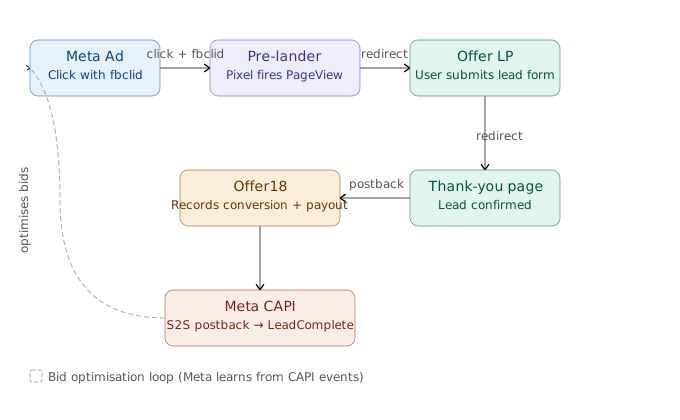
4.1 Offer18 Postback URL Setup In Offer18, go to Offer → Tracking → Global Postback and configure:
https://graph.facebook.com/v18.0/{PIXEL_ID}/events?access_token={TOKEN}Or use Offer18’s native Meta CAPI integration (if available under Integrations).
4.2 Parameter Mapping In your Offer18 affiliate link, append:
&sub1={campaign.id}&sub2={adset.id}&sub3={ad.id}&sub4={random}The {random} macro generates a unique click ID per visitor. In your postback, return sub4 value back to Meta as the event_id for deduplication.
4.3 Meta Events Manager
- In Events Manager → Test Events, verify that
LeadCompleteis firing correctly - Enable Conversions API (CAPI) under Data Sources → Settings
- Set Event Deduplication using
event_id= the sub4 click token
Step 5: Ad Creatives
Here are 5 distinct creative angles tested to work on sweepstakes CPL offers:
Production notes for each creative:
- Creative 1 (Urgency): Static image or short 6s video with a countdown timer. Use red + yellow palette. Pair with copy: “Only 50 free entries left today — grab yours now.”
- Creative 2 (Social proof): Video ad works best — a UGC-style selfie video of someone reacting to winning. If you don’t have real footage, use a stock lifestyle clip with text overlay.
- Creative 3 (Quiz): Use a carousel ad where slide 1 = question, slide 2 = “Find out if you qualify for the $1,000 prize.” Meta rewards high engagement on carousels with lower CPMs.
- Creative 4 (Price anchor): Use a static image with a large “$1,000” in bold. The simplicity cuts through the feed. Great for broad audiences.
- Creative 5 (Personalization): Use dynamic text in the headline: “[City] resident? You’ve been selected…” Meta’s dynamic creative feature can inject the user’s city automatically.
Step 6: Quality Traffic Controls
To protect lead quality (and avoid Offer18 rejections/chargebacks):
- Frequency cap: 1–2 impressions per person per 7 days
- Traffic filter: In Offer18, enable the fraud/bot filter under offer settings
- Double opt-in: If the advertiser allows it, use a 2-step pre-lander (question first, then form) — this filters passive clickers
- Day-parting: Schedule ads 8am–11pm local time. Overnight traffic often has lower quality
- Block placements: Audience Network often delivers low-quality for CPL sweeps — pause it after initial testing and focus on Facebook Feed + Instagram Feed
- Exclude: Audience aged 18–22 if quality metrics drop (high click-to-lead drop-off)
Step 7: Launch Checklist
Before going live, confirm each item:
- Offer18 postback URL is active and tested (send a test conversion)
- Meta Pixel fires correctly on pre-lander (verify in Events Manager → Test Events)
fbclidis being captured and passed via sub4 to Offer18- S2S postback from Offer18 back to Meta CAPI is confirmed
- All 5 creatives uploaded, each in its own ad for split testing
- Ad copy complies with Meta’s sweepstakes policies (no “guaranteed winner” language, include “no purchase necessary”)
- Daily budget set conservatively ($30–50/day to start)
- Conversion window: 7-day click, 1-day view (standard for CPL)